AI Product Listing Image Generator
Generate AI lifestyle images for product listings
Create lifestyle scenes from your product image using scene, lighting, ratio, and output controls. GPT Image 2 and Nano Banana Pro are available as model choices. Sign in to generate; each run uses credits, and the credit cost is shown before you generate. Review saved results in your history.
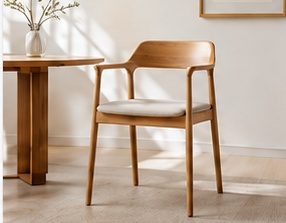
Result preview
If the tool is temporarily unavailable, the generate button stays disabled and no credits are charged.
01
Follow the workflow
- 01
Choose the product source
Upload your product image, or choose an example image or a compatible image from your history.
- 02
Set the scene controls
Choose the scene category, scene template, lighting, and supported aspect ratio.
- 03
Choose output settings
Choose one, two, or four lifestyle images, then select GPT Image 2 or Nano Banana Pro. The credit cost appears before you generate; submit when the tool is available.
- 04
Inspect each result
Preview and download completed images individually, retry images that failed, and return to your saved history.
02
What you get
- Choose a scene category, scene template, lighting, and supported image aspect ratio.
- Create one, two, or four lifestyle images with GPT Image 2 or Nano Banana Pro.
- Preview and download completed images individually, retry images that failed, and reuse a compatible image from history as a later input.
03
Limits to know before you start
- If the tool is temporarily unavailable, the generate button stays disabled and no credits are charged.
- Complex or translucent edges can reduce subject fidelity and require review before publication.
- Generated scenes do not guarantee marketplace acceptance or remove the need to verify product accuracy.
04
Common questions
Are the lifestyle scenes newly generated?
Yes when the tool is available. If it is temporarily unavailable, the generate button stays disabled and no credits are charged.
What can I do with completed or failed results?
Completed images can be previewed and downloaded individually. Images that failed can be retried, and a compatible image from history can be reused as a later input.